
APIfy Lead Processor
Built an n8n automation that processes scraped lead data from CSV files and populates Google Sheets with 30+ enriched data fields—eliminating manual data entry for sales teams.
Project Overview
Sales and marketing teams often rely on web scraping tools like APIfy to collect lead data from platforms like LinkedIn, Apollo.io, and other sources. However, getting that data into a usable format requires tedious manual work—downloading CSVs, mapping columns, and entering data into spreadsheets. I built an n8n workflow that automates this entire pipeline, turning a 30+ minute manual process into a simple file upload that completes in seconds.
Impact: Lead data processing that previously took 30+ minutes per file now completes in under 10 seconds with zero manual data entry errors.
The Challenge
Lead generation tools export data in various formats, and sales teams need this information organized consistently in their CRM or tracking sheets:
- Manual CSV handling - Downloading, opening, and copying data from scraper exports
- Field mapping complexity - Scraped data has 30+ fields that must map to specific spreadsheet columns
- Data format inconsistencies - Phone numbers, addresses, and revenue figures arrive in mixed formats
- Error-prone entry - Manual copy-paste leads to missed fields and typos
- Time sink - Each batch of leads requires repetitive data entry work
The manual workflow was inefficient:
- Open CSV file from scraper tool
- Copy relevant columns one by one
- Paste into Google Sheets
- Reformat data as needed (phone numbers, addresses)
- Verify all 30+ fields are correctly mapped
- Repeat for each new lead batch
Solution: Automated Lead Data Pipeline
Architecture
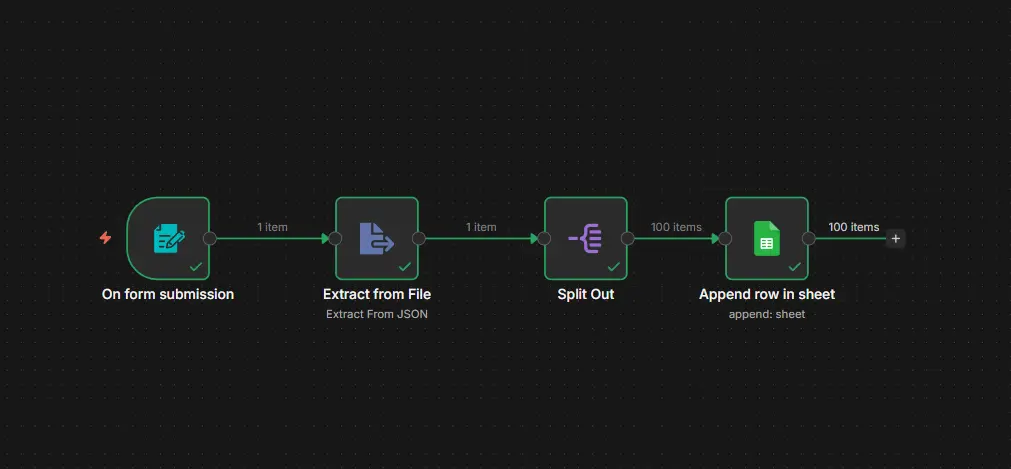
The workflow operates in four stages:
-
Form Upload Trigger - Simple web form accepts CSV file uploads from team members
-
Data Extraction - ExtractFromFile node parses the CSV and converts it to JSON format
-
Record Splitting - SplitOut node breaks the dataset into individual lead records for processing
-
Google Sheets Integration - Maps 30+ data fields (contact info, company details, LinkedIn URLs, revenue data) to the appropriate spreadsheet columns
Data Fields Processed
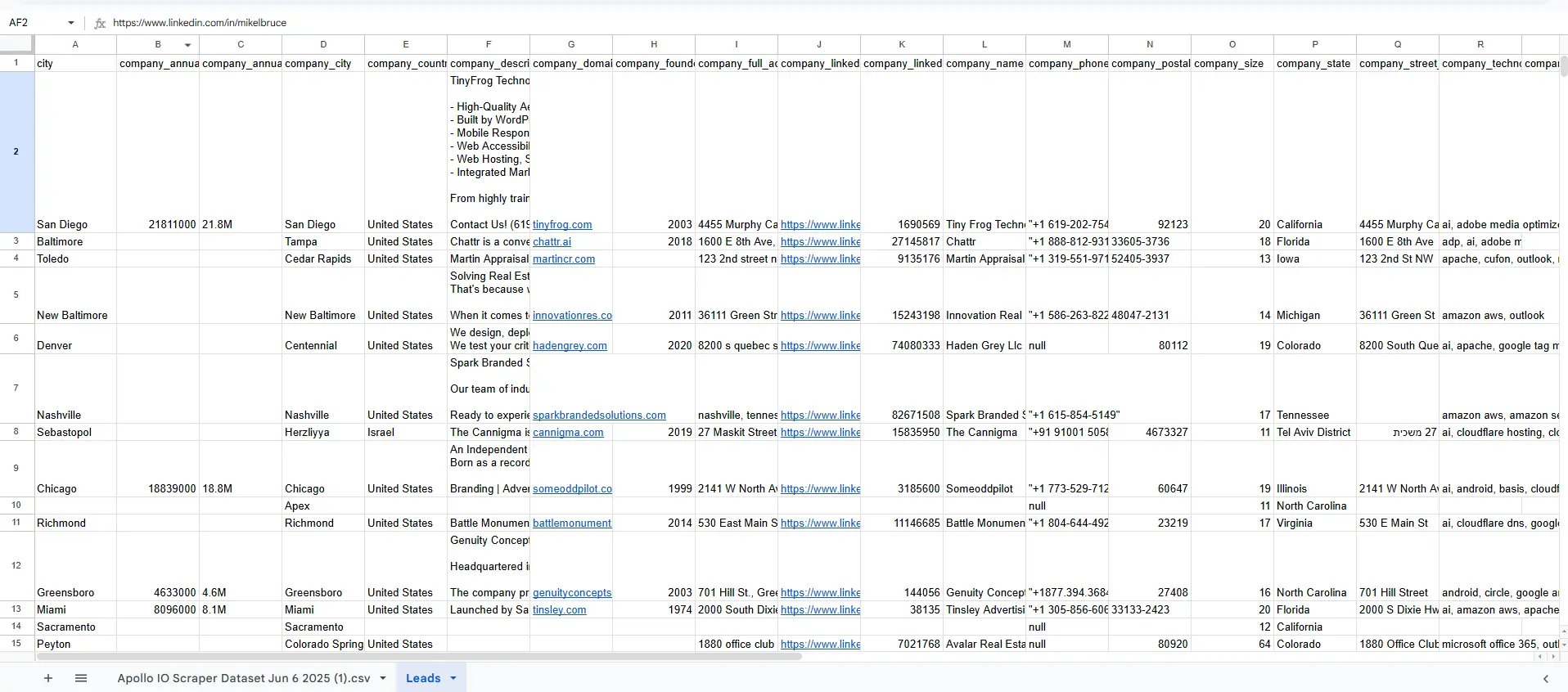
The workflow handles comprehensive lead profiles with 30+ mapped fields:
| Category | Fields |
|---|---|
| Contact Info | First name, last name, full name, email, personal email, phone, mobile number |
| Professional | Job title, headline, seniority level, functional level, LinkedIn URL |
| Company | Company name, domain, website, description, founded year, size |
| Location | City, state, country, full address, postal code |
| Financial | Annual revenue, total funding (raw and clean formats) |
| Tech Stack | Company technologies, LinkedIn UID, keywords |
Key Features
- Form-Based Upload - Team members upload CSV files through a simple web interface—no n8n access required
- Automatic Field Mapping - All 30+ fields map directly to Google Sheets columns without manual configuration
- Data Type Handling - Phone numbers are JSON-stringified to preserve formatting; nested data is flattened
- Batch Processing - Handles multiple leads in a single upload, splitting records automatically
- Error Resilience - Workflow continues processing even if individual records have missing fields
Workflow Components
The automation chains together specialized n8n nodes:
- Form Trigger - Web form with file upload capability
- ExtractFromFile - Parses CSV binary data into workable JSON
- SplitOut - Separates array of leads into individual items for row-by-row processing
- Google Sheets - Appends each lead as a new row with complete field mapping
Results
| Metric | Manual Process | Automated |
|---|---|---|
| Processing time | 30+ minutes per file | < 10 seconds |
| Data entry errors | Common (typos, missed fields) | Zero |
| Field mapping | Manual for each upload | Pre-configured (30+ fields) |
| Team access | Requires spreadsheet access | Simple web form |
Sample output:
Technologies Used
- n8n - Workflow automation platform (self-hosted)
- Google Sheets API - Data destination with OAuth2 authentication
- Form Trigger - Web-based file upload interface
- CSV Processing - Native n8n file extraction nodes
Lessons Learned
-
Form triggers democratize automation - Team members who don't know n8n can still use the workflow through a simple upload form, removing the bottleneck of technical gatekeepers.
-
Field mapping is worth the upfront investment - Spending time to properly map all 30+ fields initially saves countless hours of manual work and eliminates the risk of data ending up in wrong columns.
-
Handle data type quirks - Phone numbers and arrays need special handling (JSON.stringify for phone fields) to prevent Google Sheets from mangling the formatting.
-
SplitOut is essential for batch processing - Processing leads as individual items rather than arrays enables proper row-by-row insertion and better error isolation.
Interested in similar solutions?
Let's discuss how I can help with your project.